Before the Business Plan, Map the Business Model Canvas
Use the business model canvas to map customers, value, delivery, and costs on one page, then trace how a changed assumption affects the rest.
Before you write a business plan, use the business model canvas to see whether the venture’s parts fit together on one page. A change to the customer, offer, or delivery method can reshape the work and money elsewhere; the canvas makes those links easier to inspect.
What belongs on the canvas?
The business model canvas is a one-page framework with nine connected areas. It is not a miniature business plan: it holds concise assumptions that you can question, revise, and compare.
- Customer segments: The people or organizations you intend to serve. Name a specific group rather than “everyone who needs this.”
- Value propositions: The useful result or experience you expect to provide for each segment.
- Channels: How customers discover, evaluate, buy, and receive what you offer.
- Customer relationships: How you attract customers, support them, and stay in touch.
- Revenue streams: What customers pay for and how payment is collected.
- Key resources: The people, equipment, knowledge, space, or rights needed to deliver.
- Key activities: The work the venture must do reliably.
- Key partnerships: Outside people or organizations that supply resources or help the model work.
- Cost structure: The main expenses created by the resources, activities, channels, and partnerships.
Keep each entry brief enough to read at a glance. A phrase such as “weekly pickup at the library” is more useful than a paragraph describing a channel, because it leaves room to compare alternatives.
How should you fill in the business model canvas?
Start with the customer segment and the value proposition, then sketch how the venture reaches and supports that customer. Add revenue and the operating pieces afterward. This order keeps the page anchored in whom the business serves rather than in a list of tasks the founder would like to do.
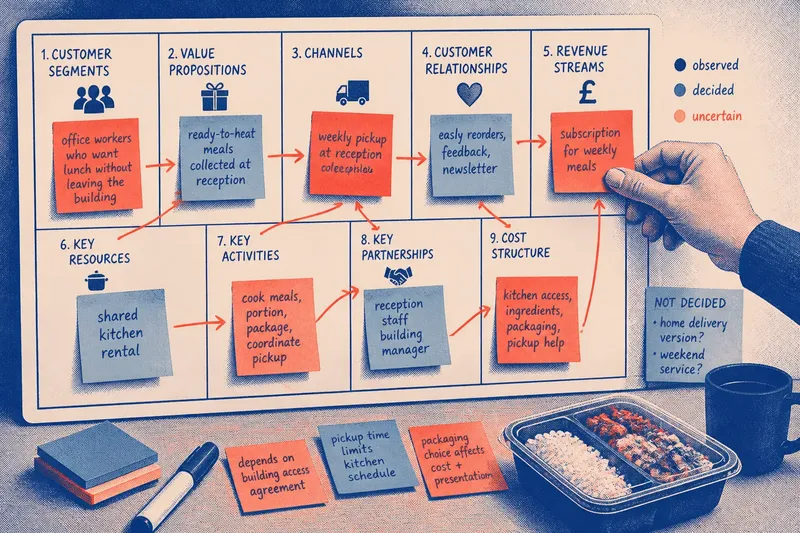
Use sticky notes on a wall or a shared board in Miro, FigJam, or a spreadsheet with nine labeled cells. Put one assumption on each note. Separate ideas that sound similar but would require different decisions, such as direct online sales and sales through a local shop.
Write uncertain claims as claims, not facts. “Parents will choose a weekend pickup” signals a belief that needs attention; “weekend pickup” alone can look like a settled operating decision. You can mark notes as observed, decided, or still uncertain, using a simple symbol or color.
Imagine you are considering a small meal-prep service for people working near a neighborhood office district. You place “office workers who want lunch without leaving the building” in customer segments, “ready-to-heat meals collected at reception” in value propositions and channels, and “shared kitchen rental” under key resources. If you then change the customer to families ordering for home delivery, revisit packaging, delivery, customer support, and costs rather than editing only the customer box.
Which assumptions affect the rest of the model?
Read across the page by asking what each choice requires. A customer segment implies ways to reach that group; a delivery promise implies labor, materials, and a handoff; a revenue stream must make sense alongside the customer’s buying situation and the costs of serving them.
Draw arrows between notes when one depends on another. For example, a channel that relies on a partner may depend on an agreement, while that partner may require a particular schedule or packaging format. The arrows are not extra canvas boxes. They show where a change could create several new questions.
Look for assumptions that carry several other choices. If the venture depends on customers collecting orders at a particular location, that location may shape the offer, hours, staffing, and cost structure. Mark the assumption visibly so it is not buried among details that are easier to change.
When an assumption changes, update every affected box and arrow. Keep an earlier version or duplicate the board before editing; comparing versions helps distinguish a real shift in the model from a wording improvement.
What should you leave off the page?
Do not turn the canvas into a catalog of every possible customer, supplier, feature, or expense. List the choices that describe the current model, and put alternatives in a separate area. Otherwise, a page full of options can disguise the fact that the venture has not made a decision.
Skip detailed forecasts, legal terms, job descriptions, and operating procedures here. Those may matter later, but they need their own documents and suitable professional input where relevant. The canvas is for seeing how the basic choices connect, not for replacing specialist advice or a fuller plan.
Use concrete nouns and verbs. “Promote the service” is vague; “send a menu through the office newsletter” identifies an activity and a channel that can be discussed. “Low overhead” is also too broad: name the expense categories that appear to matter, such as kitchen access, packaging, or delivery help.
How do you keep the canvas useful?
Revisit the page when a decision changes, not merely because time has passed. A new sales route, a different customer, or a revised delivery promise may alter several connected assumptions. Record the reason for the change beside the canvas version so collaborators can follow the decision.
Before a conversation with a potential collaborator or adviser, point to the uncertain parts rather than presenting the canvas as a finished answer. Ask which dependency seems unclear, what would have to be true for a channel to work, or which cost follows from a particular promise. This turns the page into a practical discussion aid.
Keep a short “not decided” area beside the canvas for questions that do not yet belong in a box. Move an item onto the main page when it becomes part of the proposed model; remove it if it proves irrelevant. That small boundary helps prevent unresolved possibilities from being mistaken for commitments.
What questions help you check a business model canvas?
Can the same canvas serve different customer groups?
It can, if the groups share a similar offer, delivery path, and revenue logic. If each group needs a distinct promise or operating setup, make separate versions so the differences remain visible.
Should costs and revenue include exact figures?
Use the canvas to name what creates costs and what customers pay for; keep detailed financial assumptions in a separate working sheet. That lets you revise the model without making a rough figure look more settled than it is.
How often should you revise the canvas?
Revise it whenever new information or a deliberate choice changes an assumption, connection, or dependency. Note what changed and why, then scan the linked boxes for consequences.
What if an important part does not fit a box?
Put it in a margin note and decide whether it changes one of the nine areas or creates a question for later. Do not force a detail into the wrong box just to make the page look complete.
A useful business model canvas is not the one with the most polished wording; it is the one that makes a consequential assumption visible. Keep the page legible, preserve meaningful revisions, and let each change prompt a check of the choices connected to it before you turn the model into a fuller business plan.